Odoo WooCommerce Connector
Seamlessly connect Odoo with WooCommerce and automate real-time synchronization of products, orders, customers, and inventory — eliminating manual data entry and giving your team complete, centralized control over your e-commerce operations.
Odoo WooCommerce Connector
Seamlessly connect Odoo with WooCommerce and automate real-time synchronization of products, orders, customers, and inventory — eliminating manual data entry and giving your team complete, centralized control over your e-commerce operations.
What is the Odoo WooCommerce Connector Module?
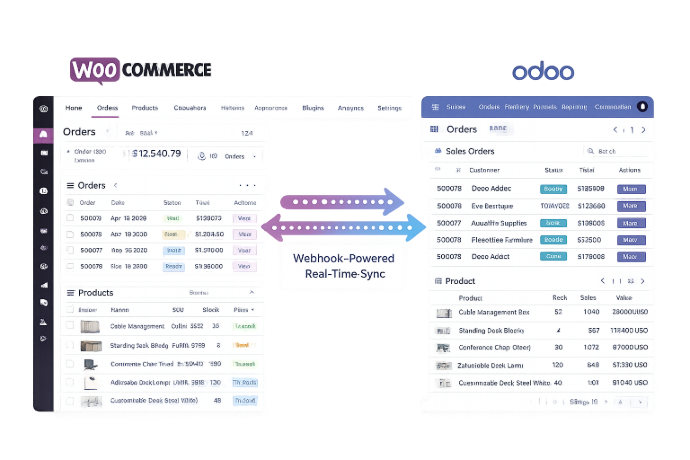
The Odoo WooCommerce Connector is a powerful integration module that bridges your Odoo ERP and WooCommerce store with a fully automated, real-time synchronization engine. It eliminates the operational gap between your ERP and e-commerce platform — keeping products, orders, customers, and inventory perfectly aligned across both systems without manual effort.
- Multi-Store from One Odoo Instance — Connect and manage multiple WooCommerce stores centrally, without switching between platforms.
- True Bidirectional Sync — Every product update, new order, and customer record change flows automatically between Odoo and WooCommerce in both directions.
- Webhook-Powered Automation — One-click webhook creation activates real-time event-driven sync — no polling, no delays, no manual triggers.
- Centralized Operations Dashboard — Monitor store performance, sync status, and key e-commerce metrics from a single clean dashboard inside Odoo.
- Full Sync Transparency — Detailed sync logs and error handling give your team complete visibility into every synchronization event.
Whether you run one WooCommerce store or manage a portfolio of brands, the Odoo WooCommerce Connector transforms your e-commerce operations into a single, automated, centrally controlled workflow — reducing errors, saving time, and scaling with your business.
What is the Odoo WooCommerce Connector Module?
The Odoo WooCommerce Connector is a powerful integration module that bridges your Odoo ERP and WooCommerce store with a fully automated, real-time synchronization engine. It eliminates the operational gap between your ERP and e-commerce platform — keeping products, orders, customers, and inventory perfectly aligned across both systems without manual effort.
- Multi-Store from One Odoo Instance — Connect and manage multiple WooCommerce stores centrally, without switching between platforms.
- True Bidirectional Sync — Every product update, new order, and customer record change flows automatically between Odoo and WooCommerce in both directions.
- Webhook-Powered Automation — One-click webhook creation activates real-time event-driven sync — no polling, no delays, no manual triggers.
- Centralized Operations Dashboard — Monitor store performance, sync status, and key e-commerce metrics from a single clean dashboard inside Odoo.
- Full Sync Transparency — Detailed sync logs and error handling give your team complete visibility into every synchronization event.
Whether you run one WooCommerce store or manage a portfolio of brands, the Odoo WooCommerce Connector transforms your e-commerce operations into a single, automated, centrally controlled workflow — reducing errors, saving time, and scaling with your business.
Why Businesses Need the Odoo WooCommerce Connector
Running WooCommerce and Odoo as disconnected systems creates data gaps, costly errors, and wasted team hours. Our connector eliminates every one of these problems automatically.
Common Challenges
Manual Data Entry Across Platforms
WooCommerce orders must be manually re-entered into Odoo, consuming team time and introducing errors at every step of the fulfillment process.
Inventory Levels Fall Out of Sync
Without automatic synchronization, stock shown in WooCommerce diverges from actual Odoo inventory — leading to overselling and customer dissatisfaction.
Fragmented Multi-Store Management
Businesses with multiple WooCommerce stores have no unified view of operations, forcing teams to manage each store separately with no central control.
Blind Spots in Sync Activity
Failed or incomplete synchronizations go undetected without proper logging — causing silent data inconsistencies that are difficult to trace and fix.
How Our Connector Solves It
Fully Automated Bidirectional Sync
Products, orders, customers, and inventory sync automatically between Odoo and WooCommerce — zero manual entry, zero processing delays.
Real-Time Inventory Alignment
Webhook-driven sync keeps stock levels consistent across both platforms the moment a change occurs — preventing overselling before it happens.
Centralized Multi-Store Control
Manage all your WooCommerce stores from a single Odoo instance with one unified dashboard — complete operational visibility across every brand.
Complete Sync Logs & Error Visibility
Every sync event is logged with detailed records and error handling — giving your team the transparency to detect, diagnose, and resolve issues fast.
Why Businesses Need the Odoo WooCommerce Connector
Running WooCommerce and Odoo as disconnected systems creates data gaps, costly errors, and wasted team hours. Our connector eliminates every one of these problems automatically.
Common Challenges
Manual Data Entry Across Platforms
WooCommerce orders must be manually re-entered into Odoo, consuming team time and introducing errors at every step of the fulfillment process.
Inventory Levels Fall Out of Sync
Without automatic synchronization, stock shown in WooCommerce diverges from actual Odoo inventory — leading to overselling and customer dissatisfaction.
Fragmented Multi-Store Management
Businesses with multiple WooCommerce stores have no unified view of operations, forcing teams to manage each store separately with no central control.
Blind Spots in Sync Activity
Failed or incomplete synchronizations go undetected without proper logging — causing silent data inconsistencies that are difficult to trace and fix.
How Our Connector Solves It
Fully Automated Bidirectional Sync
Products, orders, customers, and inventory sync automatically between Odoo and WooCommerce — zero manual entry, zero processing delays.
Real-Time Inventory Alignment
Webhook-driven sync keeps stock levels consistent across both platforms the moment a change occurs — preventing overselling before it happens.
Centralized Multi-Store Control
Manage all your WooCommerce stores from a single Odoo instance with one unified dashboard — complete operational visibility across every brand.
Complete Sync Logs & Error Visibility
Every sync event is logged with detailed records and error handling — giving your team the transparency to detect, diagnose, and resolve issues fast.
Core Features of the Odoo WooCommerce Connector
Complete real-time integration between Odoo and WooCommerce — powered by webhooks and bidirectional sync
Multiple WooCommerce Store Connections
Connect multiple WooCommerce stores to a single Odoo instance, enabling your team to manage products, orders, customers, and inventory across all stores from one centralized platform.
Bidirectional Syncing
Achieve seamless synchronization of products, orders, customers, and inventory between Odoo and WooCommerce — changes on either platform are automatically reflected on the other in real time.
One Click Webhook Creation
Create WooCommerce webhooks directly from Odoo with a single click — instantly enabling automated syncing between both platforms without any manual WooCommerce configuration.
Automatic Syncing via Webhooks
Keep data automatically synchronized between Odoo and WooCommerce using webhooks — ensuring every product update, new order, and customer change is instantly propagated without manual intervention.
Informative and Clean Dashboard
Access an informative and clean dashboard that displays key information about your e-commerce operations — giving your team a real-time, centralized view of WooCommerce performance from inside Odoo.
Syncing Logs and Error Handling
Track every data synchronization event with detailed syncing logs and error handling capabilities — giving your team full visibility into sync activity and the tools to resolve issues quickly.
Core Features of the Odoo WooCommerce Connector
Complete real-time integration between Odoo and WooCommerce — powered by webhooks and bidirectional sync
Multiple WooCommerce Store Connections
Connect multiple WooCommerce stores to a single Odoo instance, enabling your team to manage products, orders, customers, and inventory across all stores from one centralized platform.
Bidirectional Syncing
Achieve seamless synchronization of products, orders, customers, and inventory between Odoo and WooCommerce — changes on either platform are automatically reflected on the other in real time.
One Click Webhook Creation
Create WooCommerce webhooks directly from Odoo with a single click — instantly enabling automated syncing between both platforms without any manual WooCommerce configuration.
Automatic Syncing via Webhooks
Keep data automatically synchronized between Odoo and WooCommerce using webhooks — ensuring every product update, new order, and customer change is instantly propagated without manual intervention.
Informative and Clean Dashboard
Access an informative and clean dashboard that displays key information about your e-commerce operations — giving your team a real-time, centralized view of WooCommerce performance from inside Odoo.
Syncing Logs and Error Handling
Track every data synchronization event with detailed syncing logs and error handling capabilities — giving your team full visibility into sync activity and the tools to resolve issues quickly.
How to Use the Odoo WooCommerce Connector
Follow these steps to connect WooCommerce with Odoo and automate your entire e-commerce workflow
Install the Module
Install the Odoo WooCommerce Connector from the Apps section in your Odoo instance or purchase it from the Odoo App Store.
Connect Your WooCommerce Store
Enter your WooCommerce store URL and REST API credentials in the connector settings to establish a secure connection between Odoo and WooCommerce.
Add Additional Stores (If Needed)
Connect multiple WooCommerce stores to the same Odoo instance to centralize management of products, orders, and customers across all your stores.
Create Webhooks in One Click
Use the one-click webhook creation feature to configure WooCommerce webhooks from within Odoo — activating real-time automatic sync between both platforms instantly.
Run Initial Bidirectional Sync
Trigger the first full sync to align all products, orders, customers, and inventory data between your Odoo instance and WooCommerce store.
Monitor the Dashboard
Use the informative and clean dashboard to get a centralized real-time view of WooCommerce store performance, sync status, and key operational metrics inside Odoo.
Review Sync Logs
Check the sync logs regularly to monitor data synchronization events and use built-in error handling to quickly detect and resolve any sync issues.
Manage Everything from Odoo
All ongoing operations — product updates, order processing, customer data — are automatically synchronized via webhooks, so your WooCommerce store stays current without manual effort.
How to Use the Odoo WooCommerce Connector
Follow these steps to connect WooCommerce with Odoo and automate your entire e-commerce workflow
Install the Module
Install the Odoo WooCommerce Connector from the Apps section in your Odoo instance or purchase it from the Odoo App Store.
Connect Your WooCommerce Store
Enter your WooCommerce store URL and REST API credentials in the connector settings to establish a secure connection between Odoo and WooCommerce.
Add Additional Stores (If Needed)
Connect multiple WooCommerce stores to the same Odoo instance to centralize management of products, orders, and customers across all your stores.
Create Webhooks in One Click
Use the one-click webhook creation feature to configure WooCommerce webhooks from within Odoo — activating real-time automatic sync between both platforms instantly.
Run Initial Bidirectional Sync
Trigger the first full sync to align all products, orders, customers, and inventory data between your Odoo instance and WooCommerce store.
Monitor the Dashboard
Use the informative and clean dashboard to get a centralized real-time view of WooCommerce store performance, sync status, and key operational metrics inside Odoo.
Review Sync Logs
Check the sync logs regularly to monitor data synchronization events and use built-in error handling to quickly detect and resolve any sync issues.
Manage Everything from Odoo
All ongoing operations — product updates, order processing, customer data — are automatically synchronized via webhooks, so your WooCommerce store stays current without manual effort.
Versions & Documentation
Choose your Odoo version and explore interactive documentation
Versions & Documentation
Choose your Odoo version and explore interactive documentation
Frequently Asked Questions
Find answers to common questions about the Odoo WooCommerce Connector
Which Odoo versions does the WooCommerce Connector support?
Can I connect multiple WooCommerce stores to one Odoo instance?
What data is synchronized between Odoo and WooCommerce?
How does webhook-based sync work and why is it better?
Is there a way to monitor sync activity and troubleshoot errors?
How is this different from other WooCommerce Odoo connectors?
Frequently Asked Questions
Find answers to common questions about the Odoo WooCommerce Connector