Odoo Gantt App for Project Module
Plan and execute projects with structured timeline control inside Odoo. Manage tasks, monitor deadlines, and improve team coordination with a visual scheduling interface built directly into the Project module.
Odoo Gantt App for Project Module
Plan and execute projects with structured timeline control inside Odoo. Manage tasks, monitor deadlines, and improve team coordination with a visual scheduling interface built directly into the Project module.
What is the Odoo Gantt App for Project Module?
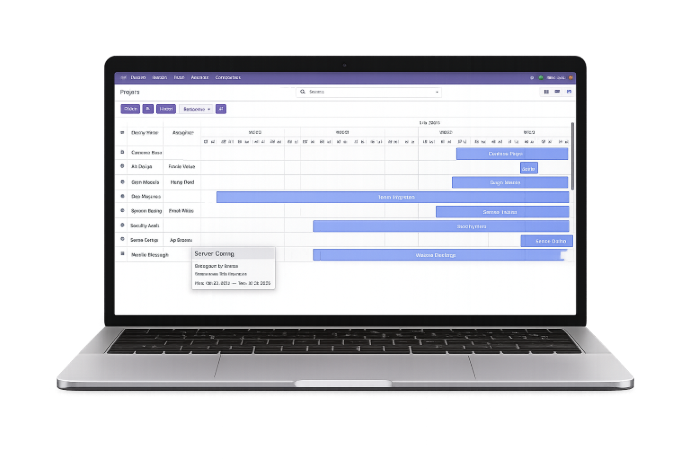
The Odoo Gantt App enhances the Project module by introducing a structured timeline-based planning system. It allows teams to schedule tasks, organize workflows, and manage project execution within a centralized visual interface.
- Structured task scheduling across project phases with clear start and end date visibility for every activity.
- Logical sequencing of tasks to ensure smooth execution and eliminate workflow disruptions.
- Logical sequencing of tasks to ensure smooth execution and eliminate workflow disruptions.
- Centralized project control within Odoo without relying on third-party planning tools.
- Better workload distribution by visually identifying task allocation across team members.
- Improved visibility of overlapping tasks and scheduling conflicts before they impact delivery.
- Faster timeline adjustments through an intuitive visual interface without complex configuration.
- Clear representation of overall project duration, progress flow, and execution structure.
Whether managing internal projects, client engagements, or enterprise-level operations, the Odoo Gantt App ensures better timeline transparency, smarter resource planning, and timely project delivery.
What is the Odoo Gantt App for Project Module?
The Odoo Gantt App enhances the Project module by introducing a structured timeline-based planning system. It allows teams to schedule tasks, organize workflows, and manage project execution within a centralized visual interface.
- Structured task scheduling across project phases with clear start and end date visibility for every activity.
- Logical sequencing of tasks to ensure smooth execution and eliminate workflow disruptions.
- Logical sequencing of tasks to ensure smooth execution and eliminate workflow disruptions.
- Centralized project control within Odoo without relying on third-party planning tools.
- Better workload distribution by visually identifying task allocation across team members.
- Improved visibility of overlapping tasks and scheduling conflicts before they impact delivery.
- Faster timeline adjustments through an intuitive visual interface without complex configuration.
- Clear representation of overall project duration, progress flow, and execution structure.
Whether managing internal projects, client engagements, or enterprise-level operations, the Odoo Gantt App ensures better timeline transparency, smarter resource planning, and timely project delivery.
Why Businesses Need a Project Gantt Chart
Projects often struggle not due to lack of effort, but because of missing time-structured planning and execution clarity. A Gantt chart introduces strategic visibility, accountability, and timeline discipline into project management.
Project Planning Challenges
Strategic Planning Gaps
Without a time-structured roadmap, projects move forward without clear execution sequencing, increasing confusion and rework risks.
Resource Allocation Imbalance
Lack of workload visibility often results in uneven task distribution, productivity loss, and operational inefficiencies.
Limited Execution Transparency
Stakeholders struggle to assess how project phases align with overall business objectives and delivery expectations.
Delayed Risk Identification
Timeline bottlenecks and execution delays are often detected too late, affecting commitments and client satisfaction.
How Our Gantt App Brings Business Clarity
Structured Time-Based Planning
Establishes a chronological execution framework that aligns daily activities with long-term project goals.
Improved Operational Visibility
Provides leadership with a consolidated overview of project flow, progress momentum, and delivery pacing.
Stronger Team Accountability
Creates shared timeline awareness, ensuring each contributor understands their responsibility in overall project success.
Proactive Delay Prevention
Enables early identification of potential disruptions, allowing corrective action before deadlines are impacted.
Why Businesses Need a Project Gantt Chart
Projects often struggle not due to lack of effort, but because of missing time-structured planning and execution clarity. A Gantt chart introduces strategic visibility, accountability, and timeline discipline into project management.
Project Planning Challenges
Strategic Planning Gaps
Without a time-structured roadmap, projects move forward without clear execution sequencing, increasing confusion and rework risks.
Resource Allocation Imbalance
Lack of workload visibility often results in uneven task distribution, productivity loss, and operational inefficiencies.
Limited Execution Transparency
Stakeholders struggle to assess how project phases align with overall business objectives and delivery expectations.
Delayed Risk Identification
Timeline bottlenecks and execution delays are often detected too late, affecting commitments and client satisfaction.
How Our Gantt App Brings Business Clarity
Structured Time-Based Planning
Establishes a chronological execution framework that aligns daily activities with long-term project goals.
Improved Operational Visibility
Provides leadership with a consolidated overview of project flow, progress momentum, and delivery pacing.
Stronger Team Accountability
Creates shared timeline awareness, ensuring each contributor understands their responsibility in overall project success.
Proactive Delay Prevention
Enables early identification of potential disruptions, allowing corrective action before deadlines are impacted.
Core Features of the Odoo Gantt App for Project
Plan, schedule, and manage projects visually with advanced Gantt tools inside Odoo.
Access Gantt View
Open the dedicated Gantt view directly from the Project module and manage timelines instantly.
Full Screen Mode
Switch to full-screen for a focused and detailed project timeline experience.
Flexible View Options
Switch between day, week, month, or year views and navigate easily across timelines.
Expand/Collapse Records
Expand or collapse tasks for detailed insights or a simplified project overview.
Edit & Delete Entries
Quickly modify or remove tasks directly from the Gantt timeline view.
Grouping & Filtering
Organize tasks with grouping, filters, and favorites just like other Odoo views.
Create New Entries
Drag across empty timeline space to instantly add new project tasks.
Update Entries
Reschedule tasks easily by dragging them to new dates for agile planning.
Core Features of the Odoo Gantt App for Project
Plan, schedule, and manage projects visually with advanced Gantt tools inside Odoo.
Access Gantt View
Open the dedicated Gantt view directly from the Project module and manage timelines instantly.
Full Screen Mode
Switch to full-screen for a focused and detailed project timeline experience.
Flexible View Options
Switch between day, week, month, or year views and navigate easily across timelines.
Expand/Collapse Records
Expand or collapse tasks for detailed insights or a simplified project overview.
Edit & Delete Entries
Quickly modify or remove tasks directly from the Gantt timeline view.
Grouping & Filtering
Organize tasks with grouping, filters, and favorites just like other Odoo views.
Create New Entries
Drag across empty timeline space to instantly add new project tasks.
Update Entries
Reschedule tasks easily by dragging them to new dates for agile planning.
How to Use the Odoo Gantt App
Follow these steps to streamline project planning with Gantt visualization
Install the Module
Install the Odoo Gantt App from the Apps section in your Odoo instance.
Open Project Module
Navigate to the Project module and select the project you want to manage.
Access Gantt View
Switch to the Gantt chart view from the available project view options.
Create Tasks
Add tasks with defined start dates, end dates, and assigned team members.
Set Task Dependencies
Link related tasks to maintain a structured and logical workflow.
Adjust Timeline
Use drag-and-drop functionality to reschedule tasks dynamically.
Track Milestones
Mark important milestones and monitor critical project deadlines.
Monitor Progress
Visually track overall project performance and make informed planning decisions.
How to Use the Odoo Gantt App
Follow these steps to streamline project planning with Gantt visualization
Install the Module
Install the Odoo Gantt App from the Apps section in your Odoo instance.
Open Project Module
Navigate to the Project module and select the project you want to manage.
Access Gantt View
Switch to the Gantt chart view from the available project view options.
Create Tasks
Add tasks with defined start dates, end dates, and assigned team members.
Set Task Dependencies
Link related tasks to maintain a structured and logical workflow.
Adjust Timeline
Use drag-and-drop functionality to reschedule tasks dynamically.
Track Milestones
Mark important milestones and monitor critical project deadlines.
Monitor Progress
Visually track overall project performance and make informed planning decisions.
Versions & Documentation
Choose your Odoo version and explore interactive documentation
Versions & Documentation
Choose your Odoo version and explore interactive documentation
Frequently Asked Questions
Find answers to common questions about the Odoo Gantt App
Which Odoo versions are supported?
Why Choose Odoo Gantt App for Project Management?
Does it support dynamic project adjustments?
Is this suitable for large enterprise projects?
Frequently Asked Questions
Find answers to common questions about the Odoo Gantt App