Odoo Gantt App for Manufacturing Module
Transform your manufacturing operations into a structured, time-driven production planning system inside Odoo. Gain complete visibility over work orders, align production capacity with demand, and improve shop floor coordination through an intelligent visual scheduling interface built directly into the Manufacturing module.
Odoo Gantt App for Manufacturing Module
Transform your manufacturing operations into a structured, time-driven production planning system inside Odoo. Gain complete visibility over work orders, align production capacity with demand, and improve shop floor coordination through an intelligent visual scheduling interface built directly into the Manufacturing module.
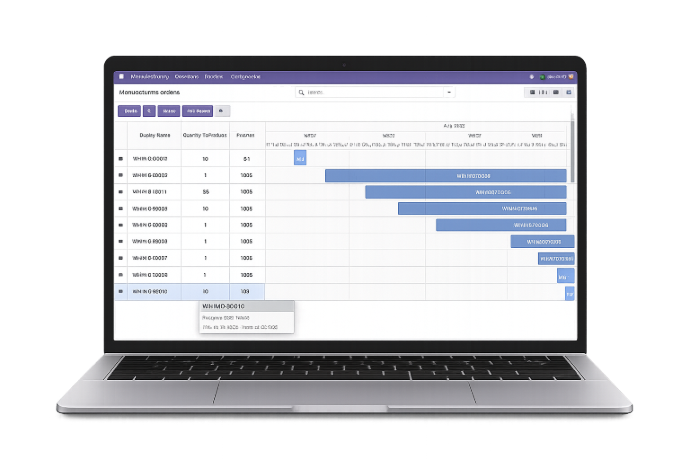
What is the Odoo Gantt App for Manufacturing Module?
The Odoo Gantt App enhances the Manufacturing module by introducing a structured, time-oriented production planning framework. It allows operations teams to organize manufacturing orders, monitor execution flow, and maintain scheduling discipline within a centralized visual environment.
- Centralized production timeline visibility across all active manufacturing orders and stages.
- Clear representation of order duration from planned start to expected completion.
- Improved coordination between production units, supervisors, and operations managers.
- Structured workload alignment to support balanced shop floor execution.
- Early identification of scheduling overlaps and capacity constraints.
- Greater transparency into production flow for better operational decision-making.
- Enhanced planning consistency without modifying Odoo’s core manufacturing logic.
- Organized timeline governance that supports predictable and stable output delivery.
Whether managing batch production, multi-stage manufacturing, or high-volume operations, the Odoo Gantt App introduces clarity, stability, and structured control into the production lifecycle—helping manufacturers move from reactive scheduling to proactive execution management.
What is the Odoo Gantt App for Manufacturing Module?
The Odoo Gantt App enhances the Manufacturing module by introducing a structured, time-oriented production planning framework. It allows operations teams to organize manufacturing orders, monitor execution flow, and maintain scheduling discipline within a centralized visual environment.
- Centralized production timeline visibility across all active manufacturing orders and stages.
- Clear representation of order duration from planned start to expected completion.
- Improved coordination between production units, supervisors, and operations managers.
- Structured workload alignment to support balanced shop floor execution.
- Early identification of scheduling overlaps and capacity constraints.
- Greater transparency into production flow for better operational decision-making.
- Enhanced planning consistency without modifying Odoo’s core manufacturing logic.
- Organized timeline governance that supports predictable and stable output delivery.
Whether managing batch production, multi-stage manufacturing, or high-volume operations, the Odoo Gantt App introduces clarity, stability, and structured control into the production lifecycle—helping manufacturers move from reactive scheduling to proactive execution management.
Why Businesses Need a Manufacturing Gantt Chart
Improve production control with structured timeline governance inside Odoo Manufacturing.
Common Production Challenges
Fragmented Production Visibility
Work orders spread across multiple views reduce clarity and coordination across departments.
Capacity Conflicts
Overlapping schedules create resource strain and operational inefficiencies.
Reactive Rescheduling
Adjustments often occur after delays rather than during planning stages.
Limited Execution Oversight
Supervisors struggle to evaluate production timelines across concurrent manufacturing orders.
Our Structured Production Approach
Centralized Timeline Governance
Introduce unified production visibility across all manufacturing orders.
Balanced Scheduling Control
Align workloads with capacity for improved operational stability.
Proactive Planning Discipline
Shift from reactive adjustments to structured production management.
Enhanced Shop Floor Coordination
Provide leadership and teams with synchronized execution oversight.
Why Businesses Need a Manufacturing Gantt Chart
Improve production control with structured timeline governance inside Odoo Manufacturing.
Common Production Challenges
Fragmented Production Visibility
Work orders spread across multiple views reduce clarity and coordination across departments.
Capacity Conflicts
Overlapping schedules create resource strain and operational inefficiencies.
Reactive Rescheduling
Adjustments often occur after delays rather than during planning stages.
Limited Execution Oversight
Supervisors struggle to evaluate production timelines across concurrent manufacturing orders.
Our Structured Production Approach
Centralized Timeline Governance
Introduce unified production visibility across all manufacturing orders.
Balanced Scheduling Control
Align workloads with capacity for improved operational stability.
Proactive Planning Discipline
Shift from reactive adjustments to structured production management.
Enhanced Shop Floor Coordination
Provide leadership and teams with synchronized execution oversight.
Core Features of the Odoo Gantt App for Manufacturing
Visualize, organize, and control production schedules with advanced Gantt tools inside Odoo Manufacturing.
Access Gantt View
Open the dedicated Gantt view directly from the Manufacturing module to visualize work orders and production schedules instantly.
Create & Manage Orders
Create new manufacturing orders easily and have them automatically reflected in the visual timeline for structured tracking.
Full Screen Mode
Switch to full-screen mode to gain a focused and comprehensive overview of your production schedule.
Flexible View Options
Navigate production timelines through day, week, month, or yearly views using intuitive timeline controls.
Edit & Delete Entries
Effortlessly modify or remove manufacturing orders directly within the Gantt interface.
Grouping, Filtering & Favorites
Organize production data efficiently by grouping, applying filters, and marking important records as favorites.
Create Directly from Timeline
Add new manufacturing records instantly by dragging across available space within the timeline.
Drag-to-Update Scheduling
Adjust production timelines dynamically by dragging existing orders to new dates for agile manufacturing control.
Core Features of the Odoo Gantt App for Manufacturing
Visualize, organize, and control production schedules with advanced Gantt tools inside Odoo Manufacturing.
Access Gantt View
Open the dedicated Gantt view directly from the Manufacturing module to visualize work orders and production schedules instantly.
Create & Manage Orders
Create new manufacturing orders easily and have them automatically reflected in the visual timeline for structured tracking.
Full Screen Mode
Switch to full-screen mode to gain a focused and comprehensive overview of your production schedule.
Flexible View Options
Navigate production timelines through day, week, month, or yearly views using intuitive timeline controls.
Edit & Delete Entries
Effortlessly modify or remove manufacturing orders directly within the Gantt interface.
Grouping, Filtering & Favorites
Organize production data efficiently by grouping, applying filters, and marking important records as favorites.
Create Directly from Timeline
Add new manufacturing records instantly by dragging across available space within the timeline.
Drag-to-Update Scheduling
Adjust production timelines dynamically by dragging existing orders to new dates for agile manufacturing control.
How to Use the Odoo Gantt App for Manufacturing
Follow these steps to activate structured production scheduling.
Install the Module
Install the Manufacturing Gantt App from the Odoo Apps section.
Open Manufacturing Module
Navigate to your Manufacturing dashboard.
Switch to Gantt View
Access the visual timeline for structured production planning.
Organize Production Orders
Structure work orders according to operational priorities.
Review Scheduling Alignment
Validate workload balance and production timing.
Monitor Execution
Continuously oversee production timelines for stability and efficiency.
How to Use the Odoo Gantt App for Manufacturing
Follow these steps to activate structured production scheduling.
Install the Module
Install the Manufacturing Gantt App from the Odoo Apps section.
Open Manufacturing Module
Navigate to your Manufacturing dashboard.
Switch to Gantt View
Access the visual timeline for structured production planning.
Organize Production Orders
Structure work orders according to operational priorities.
Review Scheduling Alignment
Validate workload balance and production timing.
Monitor Execution
Continuously oversee production timelines for stability and efficiency.
Versions & Documentation
Choose your Odoo version and explore interactive documentation
Versions & Documentation
Choose your Odoo version and explore interactive documentation
Frequently Asked Questions
Important clarifications about the Manufacturing Gantt App.
Which Odoo versions are supported?
Does this replace the default Manufacturing workflow?
Is it suitable for multi-stage production environments?
Can production managers use it for planning review?
Does it require technical configuration?
Frequently Asked Questions
Important clarifications about the Manufacturing Gantt App.