Odoo Advanced Gantt App for Manufacturing Module
Gain complete visibility into your manufacturing operations with an advanced Gantt chart inside Odoo. Schedule production orders visually, monitor progress in real time, and optimize resource allocation — all from a single interactive timeline designed to streamline modern manufacturing workflows.
Odoo Advanced Gantt App for Manufacturing Module
Gain complete visibility into your manufacturing operations with an advanced Gantt chart inside Odoo. Schedule production orders visually, monitor progress in real time, and optimize resource allocation — all from a single interactive timeline designed to streamline modern manufacturing workflows.
What is the Odoo Advanced Gantt App for Manufacturing Module?
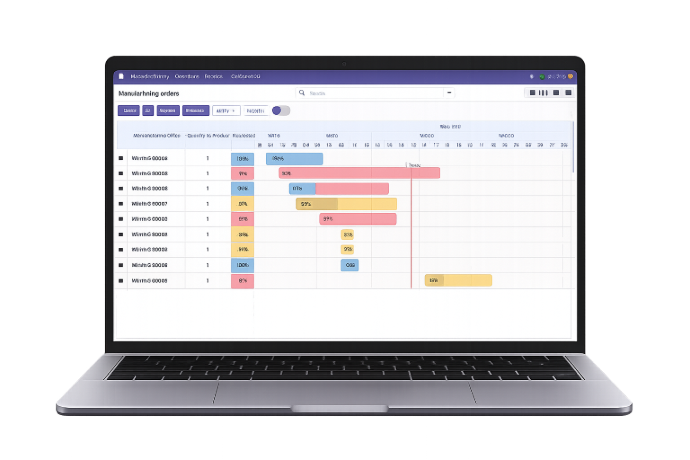
The Odoo Advanced Gantt App for the Manufacturing Module transforms production planning into a clear, visual, and controllable process inside Odoo. Instead of managing manufacturing orders through scattered lists and standard forms, it gives teams a timeline-based planning experience that makes scheduling, monitoring, and coordinating production operations far more intuitive and efficient.
- Visual Production Planning – Turn manufacturing schedules into an easy-to-understand timeline for better planning visibility.
- Centralized Manufacturing Control – Manage planning, tracking, and schedule reviews directly inside Odoo from one unified interface.
- Improved Production Coordination – Help production teams, supervisors, and decision-makers stay aligned with a shared operational view.
- Faster Scheduling Decisions – Make production adjustments more confidently with a layout designed for quick interpretation.
- Better Resource Planning – Support smarter allocation of time, responsibility, and production capacity across manufacturing orders.
- Clear Progress Visibility – Understand how production is moving at a glance without relying only on tabular records.
- Operational Efficiency at Scale – Simplify planning for growing manufacturing environments where timing, coordination, and responsiveness matter.
Whether you are managing routine production, handling multiple concurrent manufacturing orders, or improving shop floor planning, the Odoo Advanced Gantt App helps businesses bring more structure, transparency, and agility to their manufacturing operations.
What is the Odoo Advanced Gantt App for Manufacturing Module?
The Odoo Advanced Gantt App for the Manufacturing Module transforms production planning into a clear, visual, and controllable process inside Odoo. Instead of managing manufacturing orders through scattered lists and standard forms, it gives teams a timeline-based planning experience that makes scheduling, monitoring, and coordinating production operations far more intuitive and efficient.
- Visual Production Planning – Turn manufacturing schedules into an easy-to-understand timeline for better planning visibility.
- Centralized Manufacturing Control – Manage planning, tracking, and schedule reviews directly inside Odoo from one unified interface.
- Improved Production Coordination – Help production teams, supervisors, and decision-makers stay aligned with a shared operational view.
- Faster Scheduling Decisions – Make production adjustments more confidently with a layout designed for quick interpretation.
- Better Resource Planning – Support smarter allocation of time, responsibility, and production capacity across manufacturing orders.
- Clear Progress Visibility – Understand how production is moving at a glance without relying only on tabular records.
- Operational Efficiency at Scale – Simplify planning for growing manufacturing environments where timing, coordination, and responsiveness matter.
Whether you are managing routine production, handling multiple concurrent manufacturing orders, or improving shop floor planning, the Odoo Advanced Gantt App helps businesses bring more structure, transparency, and agility to their manufacturing operations.
Why Businesses Need Odoo Advanced Gantt App for Manufacturing
Traditional manufacturing planning often relies on scattered lists and manual coordination. The Advanced Gantt App brings visual clarity, better control, and smarter production planning inside Odoo.
Common Challenges
Limited Production Visibility
Manufacturing orders are often managed in list views that make it difficult to understand timelines and dependencies.
Manual Production Scheduling
Adjusting manufacturing schedules through multiple forms slows down planning and creates unnecessary complexity.
Poor Resource Coordination
Without a clear overview of production timelines, allocating responsible users or resources becomes inefficient.
Difficulty Tracking Production Progress
Production managers struggle to quickly identify delays, bottlenecks, or overlapping schedules.
How Our App Solves It
Visual Manufacturing Timeline
Production schedules become easy to understand with a timeline-based interface for better planning visibility.
Faster Production Adjustments
Production teams can quickly adapt schedules and respond to operational changes more efficiently.
Improved Production Coordination
Managers and teams share a unified production view, enabling better collaboration across operations.
Stronger Production Oversight
Decision-makers gain better visibility into manufacturing performance and production flow.
Why Businesses Need Odoo Advanced Gantt App for Manufacturing
Traditional manufacturing planning often relies on scattered lists and manual coordination. The Advanced Gantt App brings visual clarity, better control, and smarter production planning inside Odoo.
Common Challenges
Limited Production Visibility
Manufacturing orders are often managed in list views that make it difficult to understand timelines and dependencies.
Manual Production Scheduling
Adjusting manufacturing schedules through multiple forms slows down planning and creates unnecessary complexity.
Poor Resource Coordination
Without a clear overview of production timelines, allocating responsible users or resources becomes inefficient.
Difficulty Tracking Production Progress
Production managers struggle to quickly identify delays, bottlenecks, or overlapping schedules.
How Our App Solves It
Visual Manufacturing Timeline
Production schedules become easy to understand with a timeline-based interface for better planning visibility.
Faster Production Adjustments
Production teams can quickly adapt schedules and respond to operational changes more efficiently.
Improved Production Coordination
Managers and teams share a unified production view, enabling better collaboration across operations.
Stronger Production Oversight
Decision-makers gain better visibility into manufacturing performance and production flow.
Core Features of the Odoo Advanced Gantt App for Manufacturing
Explore the complete feature set designed to simplify production planning, scheduling, monitoring, and execution inside Odoo
Real-Time Manufacturing Order Management
Access the Gantt view through a dedicated icon in the Manufacturing module and create, edit, or delete manufacturing orders directly from the timeline with real-time updates.
Customizable Views and Timeline Navigation
Switch between day, week, month, and year views, adjust zoom levels from 0% to 100%, and move across schedules easily using Next, Previous, and Today controls.
Data Organization and Efficient Visualization
Expand or collapse manufacturing records for detailed or high-level views while using grouping, filtering, and favorites to organize production data efficiently.
Export, Share, and Monitor Manufacturing Order Progress
Export Gantt charts as PDF, PNG, or Excel files for reporting and sharing, while visually monitoring manufacturing order progress through color-coded bars and percentage indicators.
Resource Allocation and Manufacturing Order Assignment
Assign responsible persons or resources directly through the Gantt chart to improve workload distribution and support more balanced production planning.
Flexible Scheduling and Real-Time Order Adjustments
Update manufacturing order schedules with drag-and-drop actions to change start and end dates while keeping planning aligned with production timelines and built-in validation logic.
Full-Screen and Static Mode Options
Use full-screen mode for distraction-free schedule analysis or enable static mode to review manufacturing timelines safely without editing data.
Data Refinement
Refine the manufacturing view with sorting and filtering options based on date, progress, priority, responsible user, or status for more targeted operational analysis.
Personalization and Visual Customization
Customize the Gantt chart with color themes or assign colors based on manufacturing order status, priority, or product category to improve visual clarity.
Instant Task Insights and Visual Clarity
Hover over manufacturing orders to view key details such as order name, responsible person, dates, duration, progress, and current state, with customizable tooltip content and labels.
Custom Date Range Filtering for Manufacturing Orders
Apply custom date range filters to focus on manufacturing orders within a selected period for better schedule review, historical analysis, or forward planning.
Intuitive Editing and Deletion of Manufacturing Orders
Double-click timeline entries to update order details quickly and use edit or delete actions directly from the Gantt view for faster production management.
Core Features of the Odoo Advanced Gantt App for Manufacturing
Explore the complete feature set designed to simplify production planning, scheduling, monitoring, and execution inside Odoo
Real-Time Manufacturing Order Management
Access the Gantt view through a dedicated icon in the Manufacturing module and create, edit, or delete manufacturing orders directly from the timeline with real-time updates.
Customizable Views and Timeline Navigation
Switch between day, week, month, and year views, adjust zoom levels from 0% to 100%, and move across schedules easily using Next, Previous, and Today controls.
Data Organization and Efficient Visualization
Expand or collapse manufacturing records for detailed or high-level views while using grouping, filtering, and favorites to organize production data efficiently.
Export, Share, and Monitor Manufacturing Order Progress
Export Gantt charts as PDF, PNG, or Excel files for reporting and sharing, while visually monitoring manufacturing order progress through color-coded bars and percentage indicators.
Resource Allocation and Manufacturing Order Assignment
Assign responsible persons or resources directly through the Gantt chart to improve workload distribution and support more balanced production planning.
Flexible Scheduling and Real-Time Order Adjustments
Update manufacturing order schedules with drag-and-drop actions to change start and end dates while keeping planning aligned with production timelines and built-in validation logic.
Full-Screen and Static Mode Options
Use full-screen mode for distraction-free schedule analysis or enable static mode to review manufacturing timelines safely without editing data.
Data Refinement
Refine the manufacturing view with sorting and filtering options based on date, progress, priority, responsible user, or status for more targeted operational analysis.
Personalization and Visual Customization
Customize the Gantt chart with color themes or assign colors based on manufacturing order status, priority, or product category to improve visual clarity.
Instant Task Insights and Visual Clarity
Hover over manufacturing orders to view key details such as order name, responsible person, dates, duration, progress, and current state, with customizable tooltip content and labels.
Custom Date Range Filtering for Manufacturing Orders
Apply custom date range filters to focus on manufacturing orders within a selected period for better schedule review, historical analysis, or forward planning.
Intuitive Editing and Deletion of Manufacturing Orders
Double-click timeline entries to update order details quickly and use edit or delete actions directly from the Gantt view for faster production management.
How to Use the Odoo Advanced Gantt App for Manufacturing
Follow these eight steps to plan, schedule, and monitor manufacturing orders visually inside Odoo
Install the Module
Install the Odoo Advanced Gantt App for Manufacturing from the Apps section in your Odoo instance.
Open the Manufacturing Module
Navigate to the Manufacturing module where the Gantt view option becomes available for managing production schedules.
Access the Gantt View
Click the dedicated Gantt icon to open a visual timeline of all manufacturing orders.
Review Production Timeline
Analyze the overall production schedule through the timeline layout to understand order durations and sequencing.
Adjust Manufacturing Schedules
Modify manufacturing order timelines directly within the chart to align production planning with operational needs.
Assign Responsible Users
Allocate responsible users or production resources to manufacturing orders to maintain accountability and workflow clarity.
Monitor Production Progress
Track the status and progression of manufacturing orders directly from the visual timeline.
Share or Export Production Plans
Export production timelines or review schedules during meetings to support better production planning and coordination.
How to Use the Odoo Advanced Gantt App for Manufacturing
Follow these eight steps to plan, schedule, and monitor manufacturing orders visually inside Odoo
Install the Module
Install the Odoo Advanced Gantt App for Manufacturing from the Apps section in your Odoo instance.
Open the Manufacturing Module
Navigate to the Manufacturing module where the Gantt view option becomes available for managing production schedules.
Access the Gantt View
Click the dedicated Gantt icon to open a visual timeline of all manufacturing orders.
Review Production Timeline
Analyze the overall production schedule through the timeline layout to understand order durations and sequencing.
Adjust Manufacturing Schedules
Modify manufacturing order timelines directly within the chart to align production planning with operational needs.
Assign Responsible Users
Allocate responsible users or production resources to manufacturing orders to maintain accountability and workflow clarity.
Monitor Production Progress
Track the status and progression of manufacturing orders directly from the visual timeline.
Share or Export Production Plans
Export production timelines or review schedules during meetings to support better production planning and coordination.
Versions & Documentation
Choose your Odoo version and explore interactive documentation
Versions & Documentation
Choose your Odoo version and explore interactive documentation
Frequently Asked Questions
Find answers to common questions about the Odoo Advanced Gantt App for Manufacturing
Which Odoo versions are supported?
Does this app require technical knowledge to use?
Will this app affect existing manufacturing workflows in Odoo?
Can this app handle multiple manufacturing orders simultaneously?
Who typically uses this module within a manufacturing organization?
Frequently Asked Questions
Find answers to common questions about the Odoo Advanced Gantt App for Manufacturing