Calendar: Appointment Booking
Give clients a seamless way to book appointments through your Odoo website while keeping your schedule organized, automated, and easy to manage. From availability setup to confirmations and calendar synchronization, streamline every step of the booking experience with greater control and convenience.
Calendar: Appointment Booking
Give clients a seamless way to book appointments through your Odoo website while keeping your schedule organized, automated, and easy to manage. From availability setup to confirmations and calendar synchronization, streamline every step of the booking experience with greater control and convenience.
What is the Appointment Booking Module?
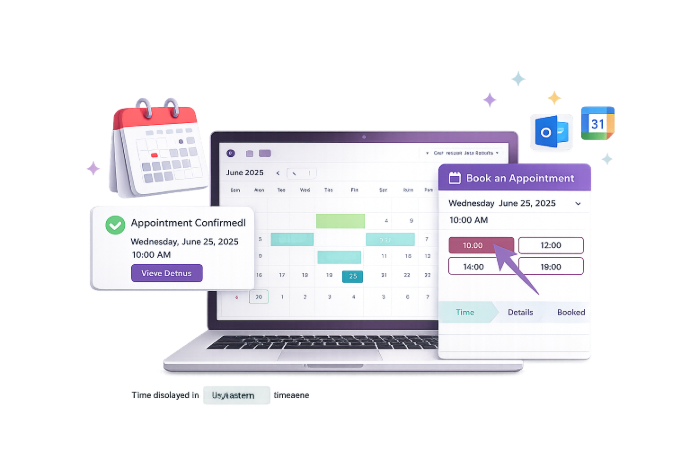
The Calendar: Appointment Booking module extends Odoo with a structured online scheduling experience that helps businesses manage appointments more efficiently through their website and calendar environment. It transforms appointment handling into a smoother, more professional workflow by reducing manual coordination and improving the way businesses interact with clients during the booking process.
- Streamlined Online Scheduling – Offer clients a more convenient way to book appointments without back-and-forth coordination.
- Centralized Appointment Management – Manage booking activities directly within Odoo for better visibility and control.
- Improved Client Experience – Deliver a smoother and more professional booking journey from availability selection to confirmation.
- Better Scheduling Flexibility – Adapt booking operations to suit changing business needs and appointment availability.
- Clearer Operational Oversight – Maintain stronger visibility into appointments, attendee flow, and booking activity.
- Reduced Administrative Effort – Minimize manual follow-up and repetitive scheduling tasks through a more organized process.
- Scalable Booking Capability – Support growing teams and client volumes with a more structured appointment workflow.
Whether you schedule consultations, service meetings, discovery calls, or client appointments, the Calendar: Appointment Booking module helps businesses improve booking efficiency, client communication, and scheduling control inside Odoo.
What is the Appointment Booking Module?
The Calendar: Appointment Booking module extends Odoo with a structured online scheduling experience that helps businesses manage appointments more efficiently through their website and calendar environment. It transforms appointment handling into a smoother, more professional workflow by reducing manual coordination and improving the way businesses interact with clients during the booking process.
- Streamlined Online Scheduling – Offer clients a more convenient way to book appointments without back-and-forth coordination.
- Centralized Appointment Management – Manage booking activities directly within Odoo for better visibility and control.
- Improved Client Experience – Deliver a smoother and more professional booking journey from availability selection to confirmation.
- Better Scheduling Flexibility – Adapt booking operations to suit changing business needs and appointment availability.
- Clearer Operational Oversight – Maintain stronger visibility into appointments, attendee flow, and booking activity.
- Reduced Administrative Effort – Minimize manual follow-up and repetitive scheduling tasks through a more organized process.
- Scalable Booking Capability – Support growing teams and client volumes with a more structured appointment workflow.
Whether you schedule consultations, service meetings, discovery calls, or client appointments, the Calendar: Appointment Booking module helps businesses improve booking efficiency, client communication, and scheduling control inside Odoo.
Why Businesses Need Calendar: Appointment Booking
Manual scheduling can slow down teams and create a poor client experience. This module helps businesses manage bookings more efficiently with a smarter and more organized scheduling workflow.
Common Challenges
Manual Appointment Coordination
Booking appointments through calls and emails consumes time and increases scheduling effort.
Inconsistent Client Experience
Unstructured booking processes can make scheduling feel inconvenient for prospects and clients.
Limited Availability Control
Businesses may struggle to manage changing time slots, booking policies, and schedule visibility efficiently.
Poor Calendar Coordination
Without integrated scheduling, teams may face conflicts, missed appointments, or fragmented calendar management.
How Our App Solves It
Simplified Online Booking
Clients can schedule appointments through a more convenient and accessible booking process.
Better Schedule Control
Businesses gain more flexibility over appointment visibility, availability, and cancellation policies.
Improved Client Communication
Booking workflows become more professional with clearer communication and confirmation handling.
Stronger Operational Visibility
Teams get a more connected view of appointments, calendars, and booking activity inside Odoo.
Why Businesses Need Calendar: Appointment Booking
Manual scheduling can slow down teams and create a poor client experience. This module helps businesses manage bookings more efficiently with a smarter and more organized scheduling workflow.
Common Challenges
Manual Appointment Coordination
Booking appointments through calls and emails consumes time and increases scheduling effort.
Inconsistent Client Experience
Unstructured booking processes can make scheduling feel inconvenient for prospects and clients.
Limited Availability Control
Businesses may struggle to manage changing time slots, booking policies, and schedule visibility efficiently.
Poor Calendar Coordination
Without integrated scheduling, teams may face conflicts, missed appointments, or fragmented calendar management.
How Our App Solves It
Simplified Online Booking
Clients can schedule appointments through a more convenient and accessible booking process.
Better Schedule Control
Businesses gain more flexibility over appointment visibility, availability, and cancellation policies.
Improved Client Communication
Booking workflows become more professional with clearer communication and confirmation handling.
Stronger Operational Visibility
Teams get a more connected view of appointments, calendars, and booking activity inside Odoo.
Core Features of the Appointment Booking App
Everything you need to manage bookings, availability, communication, and calendar coordination inside Odoo
Create Appointments for Different Time Zones
Appointments can be scheduled across different time zones, allowing businesses to serve global clients without manually calculating time differences.
Publish and Unpublish Appointments
Appointment types can be published or unpublished as needed, giving businesses control over what is visible on the website.
Set and Update Available Timing Slots
Available booking slots can be created, updated, or removed so businesses can manage appointment timing according to their schedule.
Restrict Booking from Certain Countries
Country-based restrictions can be applied to limit appointment bookings from selected locations based on business requirements.
Share Appointment URL
Personalized appointment URLs can be generated and shared through email, chat, or signatures for easier client access to scheduling.
Reporting
Booking activity can be analyzed over different time periods to help businesses review appointment trends and improve planning.
Set the Allowed Cancellation Time
A defined cancellation time can be configured to reduce last-minute cancellations and support more structured appointment handling.
Custom Booking Messages
Introduction and confirmation messages can be customized to create a more professional and informative booking experience.
Website and Calendar Integration
Published appointments are displayed on the Odoo website, and booked meetings are automatically reflected in the Odoo calendar.
Add Booking Events to Other Calendars
Booked appointments can be synchronized with external calendars such as Google Calendar, Outlook, or iCal for better schedule coordination.
Email Confirmation on Booking
Attendees receive confirmation emails containing appointment details and helpful links after a booking is completed.
Administrator Access
Specific access rights can be assigned so administrators can oversee appointments, bookings, and publishing controls more effectively.
Core Features of the Appointment Booking App
Everything you need to manage bookings, availability, communication, and calendar coordination inside Odoo
Create Appointments for Different Time Zones
Appointments can be scheduled across different time zones, allowing businesses to serve global clients without manually calculating time differences.
Publish and Unpublish Appointments
Appointment types can be published or unpublished as needed, giving businesses control over what is visible on the website.
Set and Update Available Timing Slots
Available booking slots can be created, updated, or removed so businesses can manage appointment timing according to their schedule.
Restrict Booking from Certain Countries
Country-based restrictions can be applied to limit appointment bookings from selected locations based on business requirements.
Share Appointment URL
Personalized appointment URLs can be generated and shared through email, chat, or signatures for easier client access to scheduling.
Reporting
Booking activity can be analyzed over different time periods to help businesses review appointment trends and improve planning.
Set the Allowed Cancellation Time
A defined cancellation time can be configured to reduce last-minute cancellations and support more structured appointment handling.
Custom Booking Messages
Introduction and confirmation messages can be customized to create a more professional and informative booking experience.
Website and Calendar Integration
Published appointments are displayed on the Odoo website, and booked meetings are automatically reflected in the Odoo calendar.
Add Booking Events to Other Calendars
Booked appointments can be synchronized with external calendars such as Google Calendar, Outlook, or iCal for better schedule coordination.
Email Confirmation on Booking
Attendees receive confirmation emails containing appointment details and helpful links after a booking is completed.
Administrator Access
Specific access rights can be assigned so administrators can oversee appointments, bookings, and publishing controls more effectively.
How to Use the Appointment Booking App
Follow these eight steps to set up, publish, and manage appointments through Odoo
Install Module
Install the Calendar: Appointment Booking module from the Apps section in your Odoo instance.
Create Appointment Type
Set up the appointment type you want to offer so the booking process matches your business workflow.
Define Availability
Configure available timing slots and scheduling rules based on when appointments can be booked.
Configure Booking Preferences
Set restrictions, booking questions, cancellation policy, and communication preferences according to your business needs.
Publish the Appointment
Publish the appointment so it becomes available on your website for clients and prospects to book.
Share the Booking Link
Send the appointment URL through email, chat, or other client communication channels to simplify access.
Manage Bookings
Review booked appointments, calendar updates, and attendee communication directly from Odoo.
Track and Optimize
Use booking activity and reporting insights to improve scheduling strategy and appointment handling over time.
How to Use the Appointment Booking App
Follow these eight steps to set up, publish, and manage appointments through Odoo
Install Module
Install the Calendar: Appointment Booking module from the Apps section in your Odoo instance.
Create Appointment Type
Set up the appointment type you want to offer so the booking process matches your business workflow.
Define Availability
Configure available timing slots and scheduling rules based on when appointments can be booked.
Configure Booking Preferences
Set restrictions, booking questions, cancellation policy, and communication preferences according to your business needs.
Publish the Appointment
Publish the appointment so it becomes available on your website for clients and prospects to book.
Share the Booking Link
Send the appointment URL through email, chat, or other client communication channels to simplify access.
Manage Bookings
Review booked appointments, calendar updates, and attendee communication directly from Odoo.
Track and Optimize
Use booking activity and reporting insights to improve scheduling strategy and appointment handling over time.
Versions & Documentation
Choose your Odoo version and explore interactive documentation
Versions & Documentation
Choose your Odoo version and explore interactive documentation
Frequently Asked Questions
Find answers to common questions about Calendar: Appointment Booking
Which Odoo versions are supported?
Can clients book appointments from different time zones?
Does this module work with the Odoo website and calendar?
Can bookings be synchronized with external calendars?
Who typically uses this module?
Frequently Asked Questions
Find answers to common questions about Calendar: Appointment Booking